Product Feature Update : Biometric is live

07 February 2026
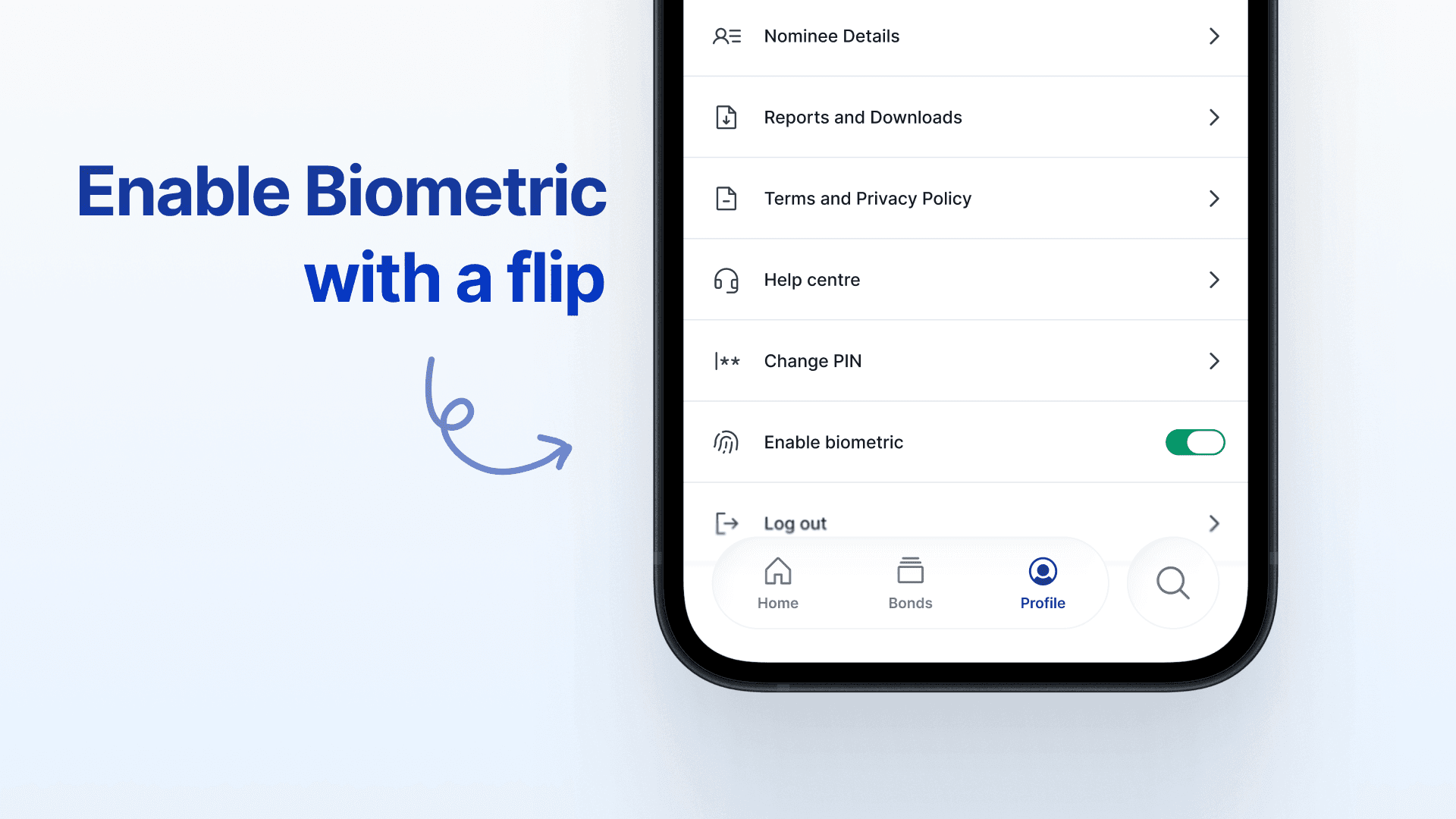

Biometric Login Is Live

Getting into your investment account should feel easy not repetitive.

Many of you open BondScanner multiple times a day. And while security is non-negotiable, we noticed a small but frequent moment of friction: logging in again and again.

This week’s update removes that friction without changing how your account is protected.

What’s New

You can now log in to BondScanner using Face ID or your fingerprint, depending on what your device supports.

It’s fast.

It’s familiar.

And it uses the same security already built into your phone.

Nothing new to learn. Nothing extra to remember.

Why We Added Biometric Login

We heard this clearly from users:

“I trust the app — I just want to get in faster.”

Biometric login is already how most of us unlock our phones, banking apps, and payment apps. It’s secure, widely trusted, and designed to reduce effort not safety. So instead of asking you to do something new, we simply aligned BondScanner with how you already use your phone.

What Changes (and What Doesn’t)

Let’s be very clear:

What changes

  • You can log in using Face ID or fingerprint

  • Login becomes quicker and more seamless

  • Fewer interruptions when opening the app

What does not change

  • Your account security remains the same

  • No passwords or PINs are removed

  • All existing protections stay intact

Biometric login is just an additional convenience layer, not a replacement for security.

How Biometric Login Works

Step 1: Open the BondScanner App

Make sure you’re on the latest version of the app.

Step 2: Enable Biometric Login from Profile

When prompted, allow Face ID or fingerprint access on your device.

Step 3: Use Biometrics to Log In

The next time you open the app, simply authenticate using your face or fingerprint.

That’s it.

No typing. No repetition.

Is Biometric Login Safe?

Yes and importantly, your biometric data never leaves your device.

BondScanner does not store your fingerprint or face data. Authentication is handled entirely by your phone’s secure system.

If your device trusts it, BondScanner trusts it.

Built for Everyday Use

This update isn’t about flashy features.

It’s about making BondScanner feel smoother, more natural, and easier to use especially for long-term investors who rely on the app regularly.

We’ll continue focusing on improvements that respect both security and simplicity.

Clarity is power

Sustvest Broking Private Limited
Sco No. 32 2nd Floor, M3M 113 Market,
Sector 113, Narsinghpur, Gurgaon,
Narsinghpur, Haryana, India, 122004

© 2025 BondScanner. All Rights Reserved

logo

Sustvest Broking Private Limited (U66120HR2024PTC119856), Member of NSE - SEBI Registration No.: INZ000320834, NSE Member Code: 90404

Registered Office: Sco No. 32 2nd Floor, M3M 113 Market, Sector 113, Narsinghpur, Gurgaon, Narsinghpur, Haryana, India, 122004
Corporate Office: Sco No. 32 2nd Floor, M3M 113 Market, Sector 113, Narsinghpur, Gurgaon, Narsinghpur, Haryana, India, 122004
Compliance Officer: CS Vandana Jhinjheria; Contact No: +91 99105 49470; Email id: Vandana.jhinjheria@bondscanner.com
Investment in securities market are subject to market risks, read all the related documents carefully before investing.

We do not charge any brokerage or service fees. Statutory charges (Exchange fees, STT/CTT, GST, etc.) apply and payable by the Client. We operate on a principal basis and may earn revenue through spreads/mark-ups.

Important information for investors:i. Prevent Unauthorised transactions in your account - Update your mobile numbers/email IDs with your Stock Brokers. Receive information of your transactions directly from Exchange on your mobile/email at the end of the day. Prevent Unauthorized Transactions in your demat account Update your Mobile Number with your Depository Participant. Receive alerts on your Registered Mobile for all debit and other important transactions in your demat account directly from NSDL/CDSL on the same day.

ii. There is no need to issue a cheque. Please write the Bank account number and sign the IPO application form to authorize your bank to make payment in case of allotment. In case of non-allotment the funds will remain in your bank account. Issued in the Interest of Investor.

iii. KYC is one time exercise while dealing in securities markets - once KYC is done through a SEBI registered intermediary (broker, DP, Mutual Fund etc.), you need not undergo the same process again when you approach another intermediary.

iv. Investor awareness on fraudsters that are collecting data of customers who are already into trading on Exchanges and sending them bulk messages on the pretext of providing investment tips and luring them to invest with them in their bogus firms by promising huge profits.

v. Advisory for investors - Clients/investors to abstain them from dealing in any schemes of unauthorised collective investments/portfolio management, indicative/ guaranteed/fixed returns / payments etc.

Risk warning: Investments in debt securities/municipal debt securities/securitised debt instruments are subject to risks including delay and/or default in payment. Read all the offer related documents carefully.

SCORES Procedure: Procedure to file a complaint on SEBI SCORES- (i) Register on SCORES portal (ii) Mandatory details for filing complaints on SCORES: Name, PAN, Address, Mobile Number, E-mail ID (iii) Benefits: Effective communication, Speedy redressal of the grievances

To lodge your complaints using SEBI SCORES, click here. Please see our Grievance Redressal Mechanism for detailed procedure in this regard. You can also lodge your complaints on the new Smart Online Dispute Resolution Platform by clicking here.

Kindly, read the Advisory Guidelines for investors as prescribed by the exchange with reference to their circular dated 27th August, 2021 regarding investor awareness and safeguarding client's assets.

Download client registration documents (Rights & Obligations, Risk Disclosure Document, Do's & Don's) in vernacular language: NSE

Attention Investors:
1. Stock Brokers can accept securities as margin from clients only by way of pledge in the depository system w.e.f. September 01, 2020.
2. Update your email id and mobile number with your stock broker / depository participant and receive OTP directly from the depository on your email id and/or mobile number to create a pledge.
3. Check your securities / MF / bonds in the consolidated account statement issued by NSDL/CDSL every month.